
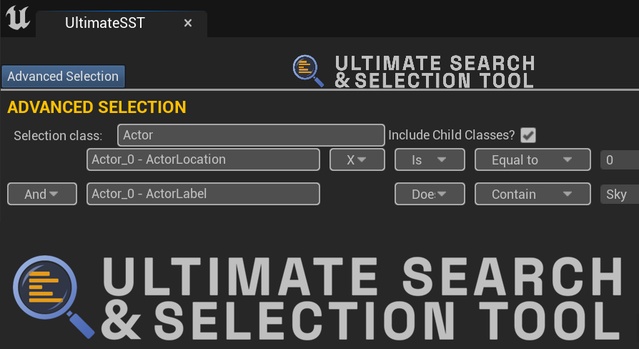
Ultimate Search & Selection Tool is an Unreal Engine editor plugin by PS Studios that selects actors in a level based on user-defined rulesets. It supports Unreal Engine 5.0 through 5.8 on Windows.
Ultimate Search & Selection Tool is a code plugin for the Unreal Engine level editor, built to make finding and selecting actors faster in large scenes. Instead of clicking through the outliner, you define a set of conditions and the tool selects every actor that matches them. It is aimed at level designers, environment artists and technical artists who work with many placed actors and need a precise way to filter them. The plugin is distributed as an editor tool, so it helps with scene building and cleanup rather than with the game build itself.
Specifications
| Seller | PS Studios |
|---|---|
| Type | Plugin |
| Category | Engine Tools |
| Engines | Unreal Engine 5.0–5.8 |
| Distribution | Code plugin |
| Formats | Unreal Engine |
| File types | .uasset |
| Unreal target platforms | Windows |
| Blueprints | 8 ( 7 helper blueprint and 1 main editor widget blueprint) |
| C++ classes | 5 |
| Licenses | Personal, Professional |
| Published | 2026-06-22 |
Key features
- Selects actors in a level by user-defined rulesets
- Comparison criteria including Contains, Starts with and More than
- Searches for any class placed in the level
- Automatically detects custom Blueprint and C++ actors and variables
- Supports most variable types except structs and arrays
- Keyboard shortcut support
- Eight Blueprints and five C++ classes
- Works with Unreal Engine 5.0 through 5.8 on Win64
What the Plugin Includes
The plugin ships as a single editor module named UltimateSST – Editor. It is built from 8 Blueprints, including 7 helper Blueprints and 1 main editor widget Blueprint, plus 5 C++ classes. The filter panel uses an interface similar to spreadsheet and CAD tools, and it works with keyboard shortcuts for faster use.
The tool can search for any class placed in your level and check each actor against specific properties. It detects custom Blueprint and C++ actors and variables automatically, so project-specific classes are available without extra setup. Variable selection covers most types, but structs and arrays are not supported.
Selection Rules and Compatibility
Rules are built from comparison criteria such as Does, Does Not, Contains, Starts with, Ends with, More than, Less than and Equal to. These let you narrow a selection by name, class or property value across the level.
Ultimate Search & Selection Tool supports Unreal Engine 5.0, 5.1, 5.2, 5.3, 5.4, 5.5, 5.6, 5.7 and 5.8. It is developed for Windows: the development platform is Win64, and the Unreal target build platform is Win64 Editor. It is delivered as a code plugin with .uasset files, and it is available under Personal and Professional licenses.
Use cases
- Level cleanup and actor audits
- Bulk selection in large environments
- Finding custom Blueprint actors
- Level design workflow tools
Ultimate Search & Selection Tool FAQ
Which Unreal Engine versions does Ultimate Search & Selection Tool support?
The plugin supports Unreal Engine 5.0, 5.1, 5.2, 5.3, 5.4, 5.5, 5.6, 5.7 and 5.8.
Which platforms does the plugin work on?
The development platform is Win64 and the Unreal target build platform is Win64 Editor, so it is designed for Windows.
Can it find custom Blueprint and C++ actors?
Yes. The tool automatically detects custom made actors and variables from both Blueprint and C++.
Which license options are available?
The plugin is offered under Personal and Professional licenses.